Reflection
Outcome
For the most part, we did achieve our minimum deliverable. Our software takes an image of a hand-drawn circuit diagram as input and produces a neat, computer-generated version as output. Our initial maximum deliverable was to provide a suite of optical character recognition services and we realized this was not a feasible goal for this project. Recognizing just resistors and capacitors involved producing 263 samples of training data and the packages we found to perform OCR only worked for very specific test cases. We are satisfied with what we set out to do in terms of our minimum deliverable.
In terms of what went well, we definitely had a clear pipeline of our general process throughout this entire project. Because of this pipeline, we could easily work in parallel, making sure each part of the pipeline feeds into the next. As a result, we could essentially start at the easiest part of the pipeline (analyzing a single segment) before moving to the front and end of the pipeline, working at segmentation and drawing each segment and the final diagram after working on the simpler parts of image processing.
In addition, our team worked on separate branches on Github and started to work each meeting by merging our branches. This kept all of our work up to date and minimized our Github problems but it did come with its own set of frustrations. Our workflow on Github definitely became a lot more convoluted using multiple branches but our team has learned a lot about how to use Github on a team project.
Finally, we followed the philosophy of “make it work, then clean it up” on our project and it actually ended up working well. With the pipeline, we had to make sure each step had the appropriate inputs and outputs. After getting each step working, we spent a significant time at the end of the project cleaning up the code, refactoring, and coming up with better solutions and algorithms than we had before. Because our inputs and outputs did not change, but our method of producing these outputs improve, we had a much cleaner and clearer pipeline. Because of this strucutre, we were able to move efficiently and rapidly prototype.
Design
The most impactful design decision we made involved separating the image processing pipeline up into entirely separate modules. This facilitated not only a neat division of labor b(see below) but also easier debugging - we were able to ensure that each individual step of the pipeline worked in isolation from all of the others before attempting to chain them together. The pipeline was complicated enough that, had we tried to do everything at once, the code would have been difficult to follow and debugging would have been frustrating.
As a result of dividing the pipeline into separate modules, though, we were each working with our own code for most of the project. As a result, we didn’t plan the structure of our code before writing it and we didn’t document to the extent that we could have as we wrote. When we began to integrate subsystems as the project progressed, we realized why it is useful to do so.
Division of Labor
Our design pipeline lent itself neatly to division of labor. We were able to split the pipeline into distinct phases, assume each phase produced an output suitable for use as the input to the next phase, and work in parallel rather than in series. For instance, we worked on line detection, component detection, and component identification simultaneously. We encountered minor challenges here - the line detection produced multiple-pixel-wide dark lines, while component detection required a line only one pixel wide, and we trained component recognition on RGB images before realizing that our pipeline would require it to identify black and white thresholded images. However, it was easy to bridge the gaps between the sub-pipelines.
Bug Report
When piecing together the segmentation process (identifying lines in an image and cropping segments out) and the component recognition process, we encountered a bug which made us think our horizontal line-finding was buggy. It consistently drew a line in the wrong place on the image, and we weren’t sure why. Upon saving the images to file and looking at them, we realized that our crop function was spilling over the edge of the image: we were including pixels outside of the image boundary in the crop box, those pixels were defaulting to black, and our horizontal line finder was trying to draw a line which took them into account. We fixed the crop box, limiting it to the image, at which point the horizontal line-finder began to work again. We could have found the bug more quickly by testing our crop function on an actual image and observing the output images before attempting to include horizontal line-finding as well.
Design
Design Pipeline
Our software takes an image of a hand-drawn circuit diagram as input. First, we convert the photo to black and white and threshold it, ensuring that the photo only exists of white pixels and black pixels, with no grayscale. We crop the border of the photo to the outermost points of each segment in the diagram. Then, we look for wires in the diagram by scanning the image for rows and columns with an average darkness darker than a defined threshold; we identify intersections and separate the diagram into line segments. We proceed to rotate each segment so that it is horizontal as this allows us to run our component finder.
Using the location of the wire that we found before, we offset a certain distance above and below the wire. We move left to right along the segment looking for any instance of non-whitespace. Upon finding these instances, we conjecture about the spacing between each component and find the start and end points of each component by looking at the space between the instances of non-whitespace. If that spacing exceeds a certain percentage of the width of the segment, we assume that the previous component has ended and a new one has started. From there, we crop an image of the located component from the diagram, and we use our component classifier to identify what component is there.
After determining the information in each segment, we draw it cleanly. Going segment by segment, we draw each one and then, using their original positions in the drawing, we paste each segment onto a final canvas. The result is our initial goal of a nicely rendered circuit diagram.
Below is a procedure of this pipeline:
1) Take photo of circuit
2) Convert to Black and White
3) Crop photo
4) Search for wires
5) Identify segments
6) Search for components
7) Classify components
8) Draw segments
9) Draw circuit
Design Story
Two important design choices we had to make involve our segmentation algorithm and the way we draw each segment.
For the segmentation algorithm, we had to make an important choice in what we classify as a segment. There are two variations of circuit diagrams, one that clearly shows the current flowing back into the battery and the other that simply shows what components should be connected either to some voltage or to ground. We chose to focus on the first type of circuit diagrams, which essentially consist of sequences of rectangles. Below are examples of both variations.
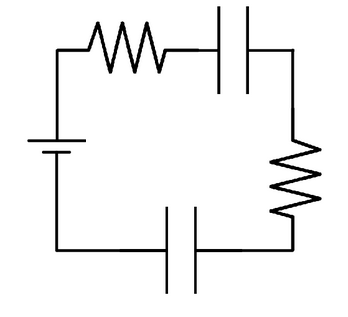
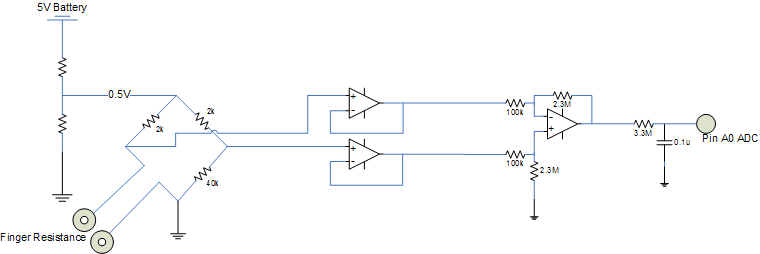
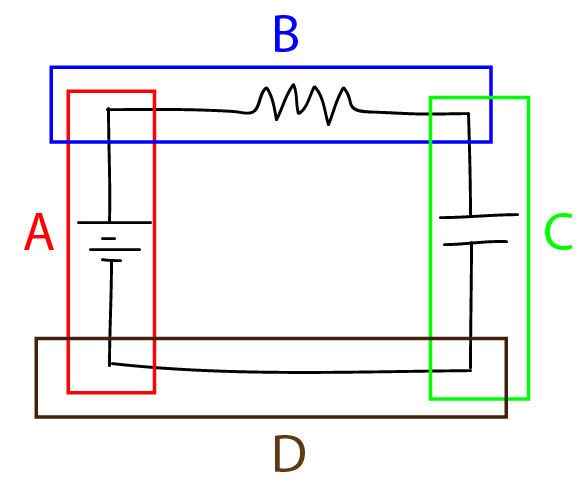
Focusing on the square circuit diagrams means that each segment must be bounded by two intersection points. We made this decision based on the input from one of our members in Signals and Systems, who saw the square diagrams more frequently in higher-level circuit classes. In addition, requiring each segment to be bounded by two intersections (rather than allowing for a segment to be bounded by one intersection and an edge) simplifies the segmentation algorithm and increases its accuracy. The diagram below describes our segmentation process.
Another design choice that we made focused on how we planned to draw each segment after determining what components are in each segment. One approach that we initially took was to draw the segment by separating each component with a wire. Thus, a segment with just a resistor in it would be drawn as: wire, resistor, wire using the images below.
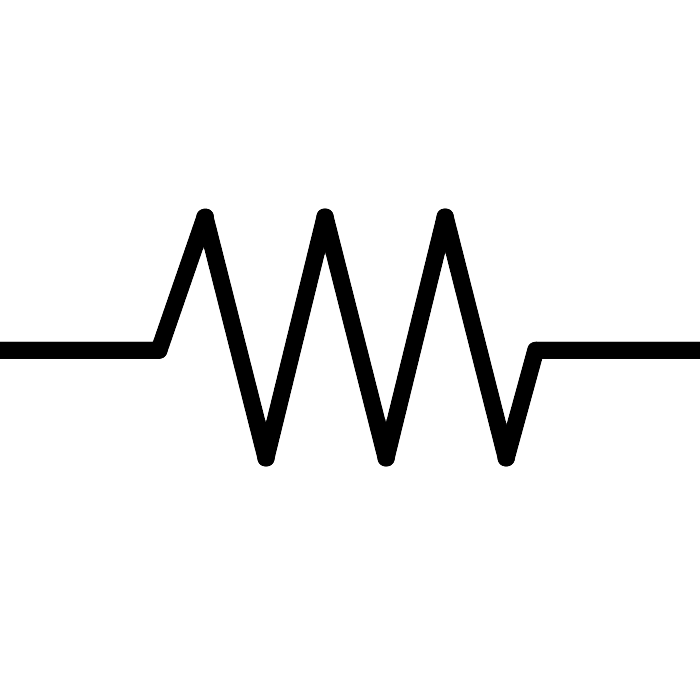
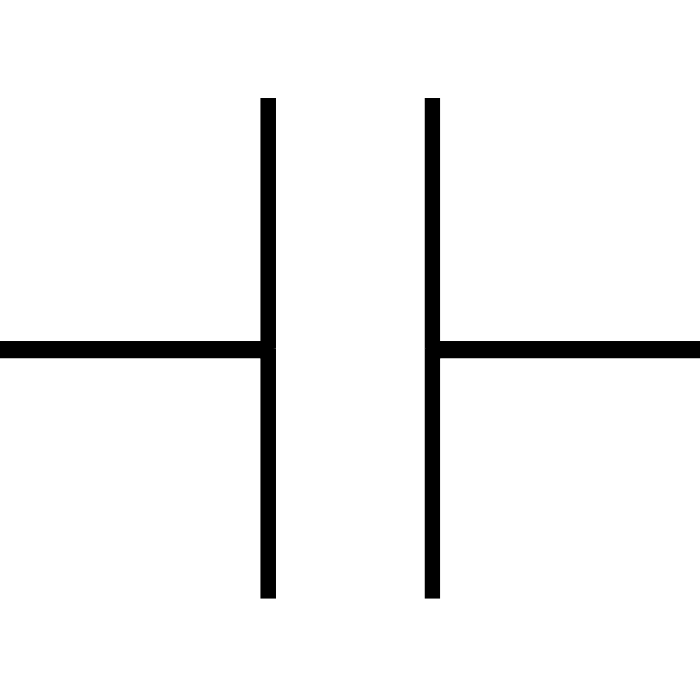
However, this approach was problematic because the length of a segment depended on the number of components it contained. If two horizontal segments that were supposed to be the same length contained different numbers of components, we would have had to scale one of them up to match, changing either the size or the aspect ratio of the components. We solved this problem by first drawing a wire of appropriate length, using only the wire image, and then superimposing the components in an evenly spaced pattern.
Data Structure
Through our image segmentation algorithm, we produce a list of line segment objects. Each line segment object is initialized with three attributes: two pixel tuples (one for either end of the segment) and an image of the hand-drawn segment. When each segment passes through first the component identifier and then the component classifier, it gains an attribute (a list describing the components along the segment and the order in which they appear) and we replace the hand-drawn image with a computer-generated one.
Development Plan
For further development, we want to improve the accuracy of our segmentation, component identification, and component classification algorithms to work on various types of user inputs. Currently, we need the user to draw the circuit using a thick marker, space the components apart and away from the edges of each segment, and we need each component to be quite large in order to accurately render a clean circuit diagram. To accomplish this, we would need to vary some of the parameters we use to threshold the image and offset the lines searching for instances of non whitespace. We would also need to provide more training images for our classifier.
In addition, we wanted to put our service online so that students could use our program to convert the circuit diagrams they had to clean renderings they could put in their lab reports. In the future, we would probably have to use Django to create our SmarterBoard web app.
Project Proposal
SmarterBoard Project Repository:
https://github.com/dinopants174/SmarterBoard
Updates on What We Have Done
Feature Extraction using Exposure Histograms of Gabor Filtered R vs C Images
88.8% Accuracy for Resistor versus Capcitor Classification
Who We Are
We are a team of 4 students from Olin College taking a Software Design course. Our project focuses on performing optical character recognition, OCR, to create a rendered circuit diagram based off of a hand-drawn schematic. Our members consist of Ryan Louie @themythicaldrago, Sarah Walters @swalters4925, Doyung Lee @doyunglee, and Zoher Ghadyali @dinopants174.
This project is designed to integrate with the R.E.S.I.S.T.O.R team. Our project will generate the circuit diagram while the R.E.S.I.S.T.O.R team will use our diagram and data to demonstrate what the circuit would look like on a breadboard. We do plan on creating a product electrical engineers and students can use in everday life and interfacing with R.E.S.I.S.T.O.R will help us achieve that goal.
What Will It Do?
The blue-sky goal of the project is to provide a suite of services that demonstrate practical uses of OCR. We have come up with a list of applications that convert images to documents containing the text within the images. These include: a note generator using text on a whiteboard, a code compiler using hand-written code, a Wolfram Alpha type service using hand-written equations or graphs, a clean rendering of a circuit diagram from a hand-drawn image, and a translator using an image of text in another language.
The project will be centered around the circuit schematic renderer - a piece of software which produces a clean, professional circuit diagram using a hand-drawn diagram. Our minimum deliverable for this project would be to render the clean diagram using simple RC circuits. If we finish this project and still have time, we may pursue some of our extensions or simply focus on creating a very professional and easy to use web-app or GUI.
We could extend the core of the project by creating some of the other tools in the software suite and using them in conjunction with the circuit diagram generator. The software would organize the data into an appropriate structure - titles, lists, tables, etc. We also have several extensions in mind concerning the specific tools we’ve thought about - the circuit diagram and graph tools could read equations and data from circuits and graphs; the circuit diagram tool could also produce vector graphics with moveable components instead of flat images. Similarly, the image-to-text converter could translate the words it reads from an image. Lastly, if we find we have plenty of time to do so, we’re potentially interested in creating a mobile or web app which makes our product usable.
Challenges Along the Way
There are some questions we need to answer in order to begin work on this project. We need to know where the wires of the circuit diagram are and how they are connected and we need to be able to understand the connections of the components in the diagram in order to interface with R.E.S.I.S.T.O.R. One problem that comes to mind is how to deal with components more complicated than resistors and capacitors that have multiple wires and connections flowing into and out of the component.
What we have found doing just a little bit of research are packages that perform OCR for us in Python. However, we realize that using these packages does not really help us achieve our goal of performing OCR ourselves. In addition, we are doing OCR on circuit diagrams, which will mean we cannot use traditional OCR packages that trained off of English and type.
Where We Need Help
We do not have an angel adviser in mind, but we would appreciate one whose expertise is in computer vision and image processing, or further down the road potentially one who has skills related to mobile development (from Python).